Comparisons · 9 min read
A Buffer alternative for TikTok, for when the queue is empty
Buffer schedules videos you have already made, across a dozen social networks. Spoolt is a Buffer alternative for brands whose real problem is having nothing to schedule: it writes the scripts, renders the videos and queues them to TikTok. Pick Spoolt if TikTok is your channel and production is the bottleneck. Stay with Buffer if you need Instagram, LinkedIn or many networks.
People rarely look for a Buffer alternative because Buffer is bad at scheduling. They look because the queue is empty. A scheduler is a shelf, and for most small brands on TikTok the shelf was never the problem. The videos were.
This guide compares Spoolt and Buffer for one job, a brand posting to TikTok. It covers where the two tools differ, when Buffer is plainly the better choice, how to try a switch without losing a week of posts, and the mistakes people make when they change tools.
Spoolt and Buffer, side by side
| What you need | Spoolt | Buffer |
|---|---|---|
| Built for | Making short videos and scheduling them to TikTok | Scheduling posts you bring, across many networks |
| Writes scripts and captions | Yes, in your brand's voice, from your website | An AI Assistant for ideas, captions and scripts |
| Makes the video | Yes: seven formats, rendered with a voiceover | Not listed; you upload your own video |
| Networks | TikTok only | TikTok, Instagram, Facebook, LinkedIn, X, YouTube, Threads, Pinterest, Google Business Profile, Bluesky, Mastodon and Substack |
| TikTok publishing | At the time you set, through TikTok's official API, after you confirm each post's settings | Auto-publishes many videos that meet TikTok's requirements; the rest go out through a notification |
| TikTok results | Per-post results pulled from TikTok, with posting times suggested from them | Basic per-post metrics such as views and engagement |
| Free plan | 1 channel and 15 scheduled posts a month, no card | Up to 3 channels and 10 scheduled posts per channel |
Buffer details were checked against buffer.com/pricing and buffer.com/tiktok in October 2026. Plans change, so read the vendor's own page before you decide.
How to choose between them
Name the bottleneck first
Write down the step that most often stops a post going out. If it is 'I forgot' or 'I was busy at 6 pm', you need a scheduler. If it is 'there was nothing to post', you need production.
Count the networks you post to today
Not the ones you plan to open. A tool that covers one network well is the wrong choice for a five-network brand, and a five-network tool is more than a TikTok-only brand needs.
Keep a person in the loop
Whichever tool you choose, someone reads each video before it is queued and chooses how it is published. Automation should remove typing and uploading, not the decision.
Try it in parallel
Run the new tool beside the old one for a month on a free plan. Compare kept videos and hours spent, not feature lists.
Where the two differ
What each tool starts from
Buffer starts from a finished post: you upload a video, write a caption and pick a time. Spoolt starts from your website. It reads your public pages, builds a brand profile you can edit, and writes scripts from that. One assumes the content exists; the other assumes it does not.
Example
A two-person candle shop. In Buffer, Monday begins with a blank composer and a video still to be filmed. In Spoolt, Monday begins with a batch of draft scripts about their own candles.
Watch out
Buying a scheduler to fix a production problem. If the queue is empty because nobody has time to film, a better queue stays just as empty.
Who makes the video
In Buffer, you do, in another app, before you open it. Spoolt turns a script you kept into a vertical video with a voiceover, in one of seven formats: slideshow, wall of text, hook and demo, AI UGC, green screen, AI story and story avatar.
Example
The same tip, 'three things that make a candle tunnel', becomes a stepped slideshow in Spoolt. For Buffer you would build it in an editor first, export it and upload the file.
Watch out
Expecting generated video to replace every video. A founder talking to camera or a real customer clip still has to be filmed. Generation covers the steady middle of the calendar.
How many networks you need
This is the clearest difference and it favours Buffer. Buffer's pricing page lists TikTok, Instagram, Facebook, LinkedIn, X, YouTube, Threads, Pinterest, Google Business Profile, Bluesky, Mastodon and Substack. Spoolt publishes to TikTok only. Instagram and YouTube are planned and not available yet.
Example
A brand that posts the same clip to TikTok, Reels and Shorts every day needs a multi-network tool today. A brand that only shows up on TikTok does not.
Watch out
Choosing on a roadmap. Buy for what a tool publishes to this month, whichever tool it is.
What happens at posting time
Buffer says it auto-publishes many TikTok videos when they meet TikTok's publishing requirements and sends a notification for the rest, such as videos that need a trending sound. Spoolt publishes at the time you set through TikTok's official API, after you have confirmed that post's settings yourself.
Example
Thursday, 6 pm. In either tool a plain video with its own audio goes out with nobody at a keyboard. A video that needs an in-app sound means opening TikTok and finishing it by hand.
Watch out
Assuming 'scheduled' always means 'posts without me'. Read how each tool handles the cases it cannot publish directly.
Privacy, interaction and disclosure settings
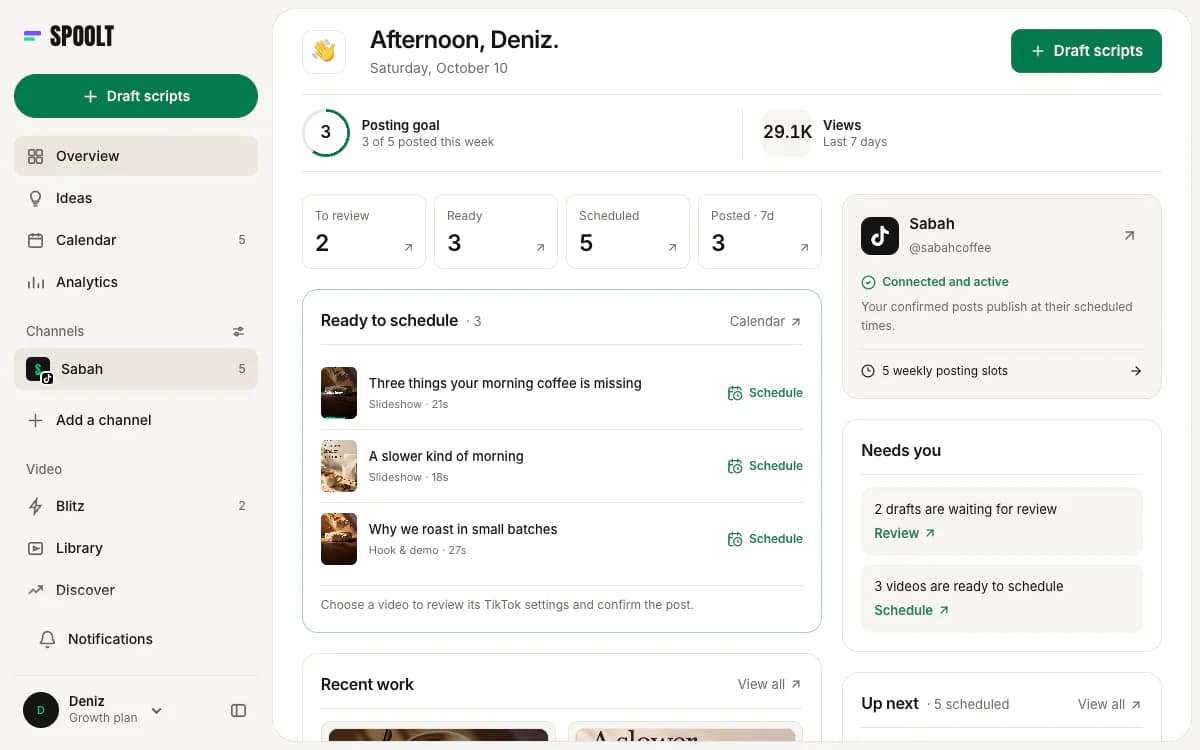
In Spoolt, every TikTok post goes through your own review: who can see it, whether comments, duets and stitches are on, and whether it is commercial content. Nothing is filled in for you and nothing is published unattended. That is one extra step per post, on purpose.
Example
Queueing twelve videos means twelve short confirmations, done in one sitting when the month is scheduled. After that the calendar runs without you.
Watch out
Looking for a way to skip the step. On a brand account, the wrong disclosure setting costs more than the ten seconds it takes to choose the right one.
The queue
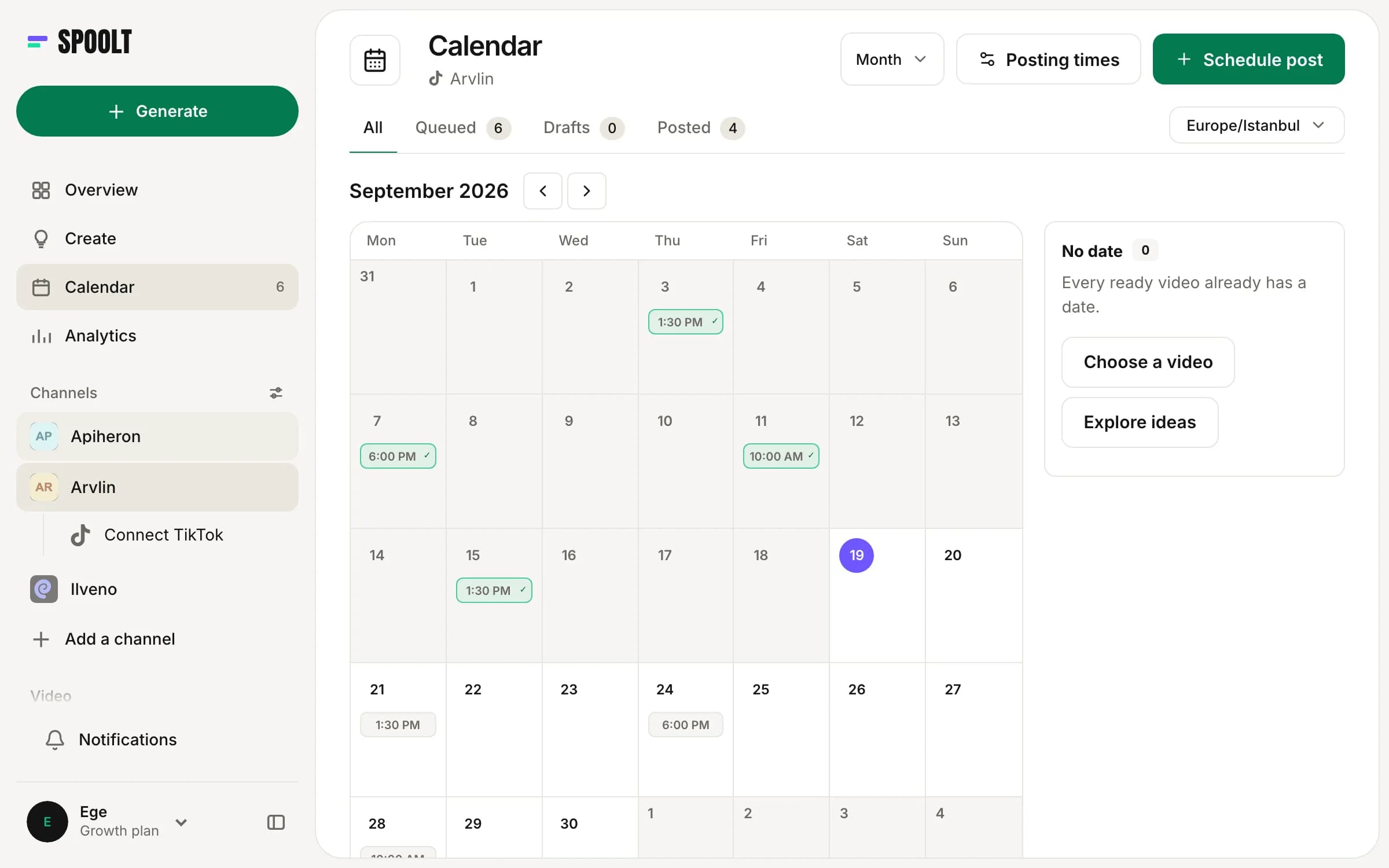
Both tools let you set posting times once and add posts to a queue instead of picking a time for each. In Spoolt you set weekly slots in your own time zone and each video takes the next free one. The difference is upstream: Spoolt can fill the queue as well as hold it.
Example
Slots on Monday, Wednesday and Friday at 6 pm. Twelve kept videos are added to the queue and land on the next twelve free slots, four weeks deep.
Watch out
Rebuilding your slots from a generic 'best time to post' chart. Keep the times your account already posts at for the first month, so the results stay comparable.
What it costs to try
Both have a free plan. As of October 2026, Buffer's free plan lists up to 3 channels and 10 scheduled posts per channel, and its paid plans are priced per channel. Spoolt's free plan is 1 channel and 15 scheduled TikTok posts a month, with no card. Spoolt's paid plans are credit-based: credits are spent on drafts and renders, not on scheduling.
Example
On Spoolt's free plan, a month's credits cover a handful of standard videos, and scheduling them costs nothing. That is enough to judge the output before paying.
Watch out
Comparing the monthly price alone. One tool's price is for a scheduler. The other's includes the writing and the rendering, which you are otherwise paying for in hours.
When Buffer is the better choice
Stay with Buffer if you manage several networks, if your videos are already made by a person or an agency, or if TikTok is a small part of what you post. Spoolt does none of those jobs today.
Example
An agency running LinkedIn, Instagram and TikTok for six clients, with finished assets arriving from a design team, has no production gap for Spoolt to fill.
Watch out
Switching because a tool is new. Switch when a specific step is costing you time. If that step is scheduling across networks, Buffer already solves it.
How a switch goes wrong
Moving every network at once
Spoolt only posts to TikTok. Cancel a multi-network tool before checking and your Instagram and LinkedIn queues go quiet the same day.
Two tools, one TikTok queue
Scheduling the same account from both tools ends in double posts or in gaps nobody notices. Pick one owner for TikTok and empty the other queue.
Judging on the first video
One generated video tells you very little. Judge on a batch: how many of twelve drafts you kept, and how long the month took to schedule.
Changing the posting times too
New tool, new times, new formats, all in one month, and you cannot say what moved the numbers. Keep the slots, change the tool.
A switch you can undo
- Day 1
Write down every network you post to and who makes each video. Anything that is not TikTok stays where it is.
- Day 2
Start Spoolt's free plan, paste your website and correct the brand profile it builds. Connect your TikTok account.
- Day 3
Generate a batch of scripts, keep the ones that sound like you and render them. Read every one before it goes further.
- Day 4
Copy your current posting times into Spoolt's weekly slots. Queue the videos and confirm each post's settings. Clear TikTok from the old tool's queue.
- Week 4
Compare the month: posts that went out, hours spent, watch time per video. Then decide which tool keeps the TikTok queue.
Buffer alternative FAQ
Is Spoolt a replacement for Buffer?
Only for TikTok, and only if you want the videos made as well as scheduled. Spoolt publishes to TikTok and nowhere else today. If Buffer runs your Instagram, LinkedIn or X, keep it for those; plenty of brands will be better served by Buffer alone.
Does Buffer make TikTok videos?
Buffer's own pages describe scheduling, an AI Assistant for ideas, captions and scripts, and crossposting. They do not list video generation, so you bring the finished file. That was the state of buffer.com/tiktok in October 2026.
Can I use Spoolt and Buffer together?
Yes. They connect to TikTok separately, so decide which one owns the TikTok queue and stop scheduling TikTok from the other. A common split: Spoolt makes and posts the TikTok videos, Buffer keeps every other network.
Is there a free way to try the switch?
Yes. Spoolt's free plan includes one channel and 15 scheduled TikTok posts a month, with no card. That is enough to run a full month beside your current tool before you move anything.
A scheduler answers 'when does this go out?'. Before you compare prices, check whether that is the question you are stuck on. If it is, Buffer answers it across more networks than Spoolt does. If the question is 'what do we post?', you need the videos, and the queue after that.
Want these written in your brand's voice? Paste your website and Spoolt turns ideas like these into a month of scripted short-form — triage in Blitz, schedule to TikTok. Free to try, no card.
← All playbooks